Top 10 GitHub Repos for Content Creation in 2026 (Verified)
The 10 best open-source GitHub repos for content creation in 2026, verified on GitHub: AI visuals, video, captions, publishing and scheduling.
The top 10 GitHub repos for content creation in 2026 are ComfyUI, MoneyPrinterTurbo, Excalidraw, OBS Studio, Remotion, Penpot, Ghost, Upscayl, Postiz and faster-whisper. Together they cover planning, AI visuals, recording, captions, video assembly, publishing and social scheduling. All were active on GitHub in November 2026; check each licence before business use.
On this page
- Key takeaways
- What makes a GitHub repo good for content creation?
- What are the top 10 GitHub repos for content creation in 2026?
- How do these repos fit together into one content pipeline?
- Why is the hard part the work between the tools?
- How should you choose your first content repo?
- What is the next step for your team?
- Frequently asked questions
Key takeaways
- ComfyUI, MoneyPrinterTurbo and Excalidraw lead this list by GitHub stars, each above 130k on 28 November 2026.
- The 10 repos cover a full content pipeline: plan, make visuals, record and caption, build video, publish and schedule.
- Licences differ a lot: MIT tools are permissive, while AGPL projects and Remotion’s own licence carry real obligations for businesses.
- Tools are rarely the bottleneck; the hand-offs between them are, and that is where a specialised, human-approved agent helps most.
- Start with one repetitive step, pick the repo that removes it, and prefer tools with an API so they can be automated later.
Content teams have a strange problem in 2026. The tools have never been better, and the to-do list has never been longer. One blog post now wants a hero image, a short video cut, captions, a newsletter version and five social posts. That is not a workflow. That is a hostage situation.
The good news: a lot of the best tooling for this is free, open source and sitting on GitHub. We checked every repo below on GitHub on 28 November 2026, took the description, stars and last activity straight from GitHub, and read each README and licence. No made-up repos, no "trust me" numbers.
What makes a GitHub repo good for content creation?#
A good content creation repo is one that saves a real creator real hours this week, not someday. We picked repos against four plain tests:
- It is alive. Every repo here had code pushed in November 2026.
- People actually use it. Stars are a rough signal, not a verdict, but tens of thousands of them usually means the install guide works.
- It covers a real stage of the job. Planning, visuals, recording, video, publishing or distribution.
- The licence is clear. Open source licences differ a lot, and we flag the ones that matter for a business.
We also skipped anything archived, abandoned or that only works as a demo. If you want to know how these lists differ from "awesome" lists, our Top 10 GitHub repos for agent skills uses the same method.
What are the top 10 GitHub repos for content creation in 2026?#
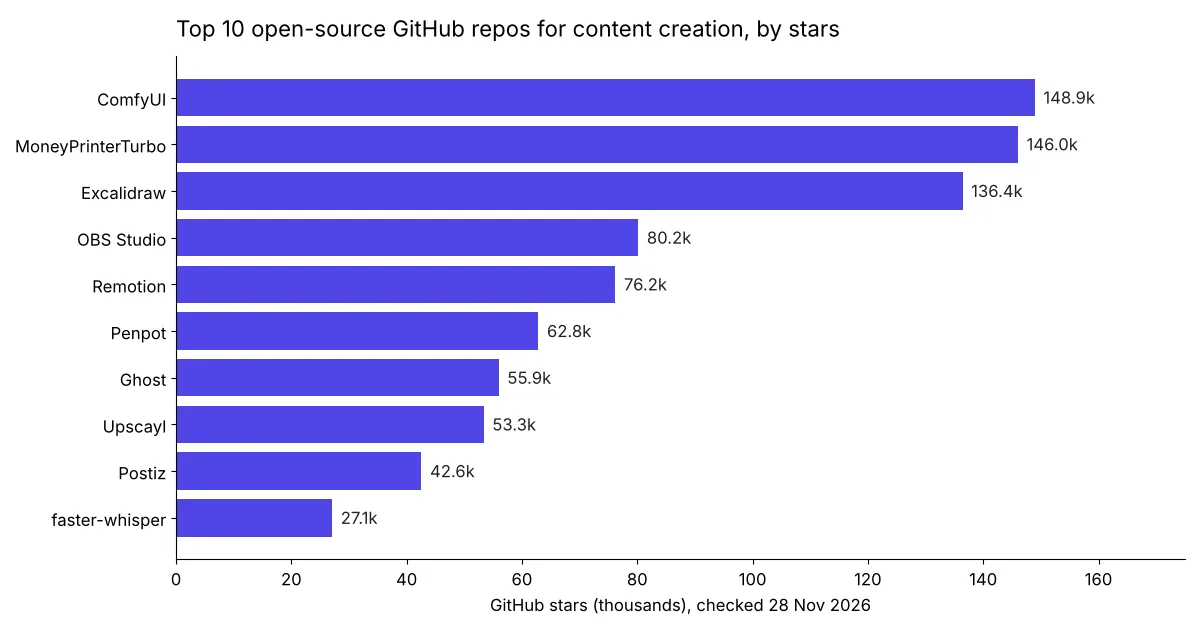
The top 10 GitHub repos for content creation in 2026 are ComfyUI, MoneyPrinterTurbo, Excalidraw, OBS Studio, Remotion, Penpot, Ghost, Upscayl, Postiz and faster-whisper. Here they are at a glance.
| # | Repo | What it does | Stars (28 Nov 2026) | Licence |
|---|---|---|---|---|
| 1 | Comfy-Org/ComfyUI | Node-based engine for AI images, video, audio and 3D | 148.9k | GPL-3.0 |
| 2 | harry0703/MoneyPrinterTurbo | Turns a topic into a finished short video | 146.0k | MIT |
| 3 | excalidraw/excalidraw | Hand-drawn style whiteboard and diagrams | 136.4k | MIT |
| 4 | obsproject/obs-studio | Screen recording and live streaming | 80.2k | GPL-2.0 |
| 5 | remotion-dev/remotion | Make videos with React code | 76.2k | Remotion License |
| 6 | penpot/penpot | Open-source design and prototyping | 62.8k | MPL-2.0 |
| 7 | TryGhost/Ghost | Publishing, newsletters and memberships | 55.9k | MIT |
| 8 | upscayl/upscayl | Desktop AI image upscaler | 53.3k | AGPL-3.0 |
| 9 | gitroomhq/postiz-app | Social media scheduling | 42.6k | AGPL-3.0 |
| 10 | SYSTRAN/faster-whisper | Fast speech-to-text for captions and transcripts | 27.1k | MIT |
1. ComfyUI: the power tool for AI visuals
ComfyUI is a visual node graph for building image, video, audio and 3D generation workflows without writing code. Its README calls it "the most powerful and modular AI engine for content creation", which is bold, but the star count backs up the popularity part.
Think of it as Lego for generative models. You wire a model, a prompt, a style and an upscaler into a graph once, then reuse that graph forever. The README says it can run large open models on as little as 4GB of VRAM and 8GB of RAM, and it exposes API endpoints, so it slots into real production pipelines.
Best for: brand teams who want repeatable, on-brand visuals instead of prompt roulette.
2. MoneyPrinterTurbo: topic in, short video out
MoneyPrinterTurbo is an all-in-one AI short video generator. Per its README, you give it a topic or keyword and it writes the script, matches stock footage, adds subtitles and background music, and renders an HD short.
The name is a bit much. The idea is sound. It is a full pipeline in one box, with a web UI and an API, under the permissive MIT licence.
Best for: first drafts of shorts and explainers. Treat the output as a rough cut, not a finished brand asset.
3. Excalidraw: the whiteboard everyone secretly loves
Excalidraw is an open-source virtual whiteboard with a hand-drawn style, collaborative and end-to-end encrypted. It is where content gets planned: outlines, story maps, explainer diagrams.
The scrappy look is the feature. A sketchy diagram says "this is an idea", which makes people comment instead of nitpicking fonts. You can also embed the editor in your own app through its npm package.
Best for: planning posts and drawing explainer diagrams that do not look like a 2009 slide deck.
4. OBS Studio: the recording workhorse
OBS Studio is free and open source software for live streaming and screen recording. If you have watched a tutorial, a webinar or a livestream this year, there is a decent chance OBS recorded it.
It has scenes, sources, audio mixing and plugins, and it runs on Windows, macOS and Linux. It is not glamorous. It just works, which is the highest compliment in this category.
Best for: demos, webinars, podcasts on video and any "let me show you" content.
5. Remotion: videos as code
Remotion lets you make videos programmatically with React. Each frame is a web page, so anything you can build in a browser becomes a video.
This matters when you need 500 personalised videos, not one. The README highlights batch rendering on your own infrastructure and "making videos agentically" with your coding agent. One honest caveat: Remotion uses its own licence. It is free for individuals, non-profits and companies of up to three employees; larger for-profit companies need a company licence. Read the Remotion licence before you build on it.
Best for: data-driven videos, product changelog clips and templated social video.
6. Penpot: open-source design for the whole team
Penpot is an open-source design platform for product teams that need scalable collaboration. Designers get vector design and prototyping; everyone else gets a browser link instead of a licence request.
For content teams it is a solid home for social templates, thumbnails and brand kits, and you can self-host it.
Best for: brand templates that the whole team can open without a seat fight.
7. Ghost: publishing and newsletters in one
Ghost describes itself as independent technology for modern publishing, memberships, subscriptions and newsletters. It is a blog, a newsletter tool and a paid membership engine in one MIT-licensed package.
If you are tired of stitching a CMS, an email tool and a payments plugin together with tape, Ghost is the calm alternative.
Best for: creators and companies who want to own their audience, not rent it.
8. Upscayl: rescue your low-res images
Upscayl is a free desktop AI image upscaler for Linux, macOS and Windows. Drag in a blurry screenshot, get a sharper, larger image back, all on your own machine.
It is a small tool that solves a constant, annoying problem. Old logos, tiny product shots and that one photo from the 2019 offsite all get a second life.
Best for: fixing images before they go into a post, a deck or a thumbnail.
9. Postiz: scheduling without the monthly bill
Postiz is a social media management platform for scheduling, automating and analysing content. Its repo tagline calls it "the ultimate agentic social media scheduling tool", and it has a public API, a Node SDK and an n8n node, so other tools (and agents) can drive it.
It posts to the usual suspects, including LinkedIn, Instagram, YouTube, TikTok, Reddit, Threads and X. You can use the hosted cloud or self-host the open-source edition under AGPL-3.0.
Best for: teams that want one calendar for every channel and an API to automate it.
10. faster-whisper: captions and transcripts, fast
faster-whisper is a reimplementation of OpenAI’s Whisper speech recognition model using the CTranslate2 inference engine. Its README says it is up to 4 times faster than openai/whisper for the same accuracy, while using less memory.
Captions are not optional any more. Many people watch video with the sound off, and transcripts feed blog posts, show notes and search. This is the engine many captioning tools quietly use under the hood.
Best for: subtitles, transcripts and turning one recording into five pieces of written content.
Honourable mention: LosslessCut (46.5k stars) is a "swiss army knife of lossless video/audio editing". It is perfect for trimming recordings without re-encoding them.
How do these repos fit together into one content pipeline?#
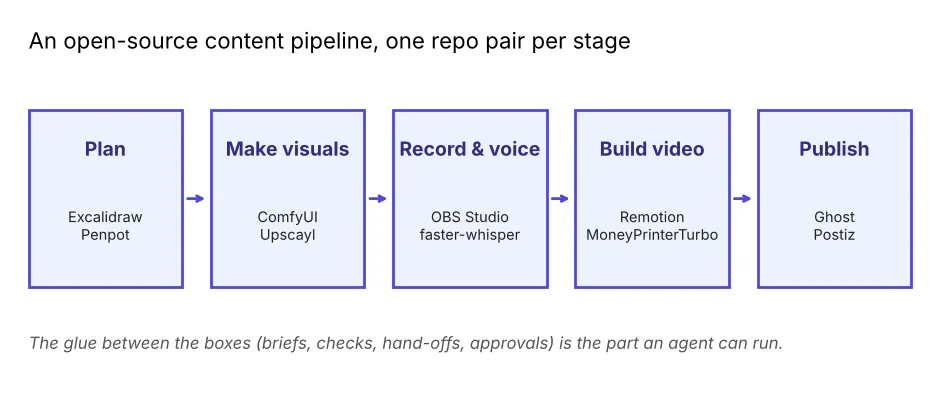
These repos fit together as a five-stage pipeline: plan, make visuals, record and voice, build video, then publish. Each stage has at least one strong open-source option.
| Stage | Main job | Repos |
|---|---|---|
| Plan | Outline, storyboard, brand templates | Excalidraw, Penpot |
| Make visuals | Generate and clean up images | ComfyUI, Upscayl |
| Record and voice | Capture screen, transcribe audio | OBS Studio, faster-whisper |
| Build video | Assemble shorts and templated clips | Remotion, MoneyPrinterTurbo |
| Publish | Blog, newsletter, social calendar | Ghost, Postiz |
Notice what is missing from that table. Nobody owns the arrows.
Why is the hard part the work between the tools?#
The hard part is the work between the tools, because that is where content quietly breaks. Someone has to turn the brief into prompts, check the generated image is on brand, pull the transcript into a draft, confirm the facts, resize for each channel and schedule it at the right time.
That glue is exactly where specialised AI agents earn their keep. Not a general chatbot that "can help with content", but an agent with one narrow job, clear inputs and a defined finish line. When we build agents at Incube, the first thing we map is these hand-offs, not the tools. Tools are usually fine. Hand-offs are where the hours go.
Here is the checklist we use before letting an agent touch a content pipeline:
- One job, written down. "Turn each webinar recording into a captioned clip, a transcript and three social drafts" beats "help with marketing".
- Tools it can call, and nothing else. An API like Postiz’s or ComfyUI’s is a gift. Screen-scraping is a liability.
- Checks before anything ships. Brand rules, banned claims, link checks and fact checks run on every output, every time.
- A human approves what goes public. The agent drafts and schedules. A person presses publish until trust is earned.
- Logs and a kill switch. You should see what it did and be able to stop it instantly. We wrote more on that in what is an AI agent kill switch.
This is the same approach behind the production agents on our services page: narrow, tested, verified and monitored, with humans in control. A content agent looks a lot like our inbox triage agent, just pointed at a different queue. And if you are wondering how much context an agent needs to write in your brand voice, our guide to context engineering covers it.
How should you choose your first content repo?#
Choose your first content repo by finding the single most repetitive step in your current workflow, then picking the tool that removes it. Do not install all ten on a Friday afternoon. You will spend Monday uninstalling eight.
A quick guide:
- Drowning in video edits? Start with faster-whisper for captions, then try Remotion or MoneyPrinterTurbo.
- Visuals look inconsistent? Build one ComfyUI workflow and one Penpot template set.
- Posting is chaos? Self-host Postiz and put every channel on one calendar.
- Running on three tools and a spreadsheet? Ghost can probably replace two of them.
Before you commit, check three things: the licence (AGPL and the Remotion licence have real obligations), who will maintain the install, and whether the tool has an API. The API question matters more than it looks. It is the difference between a tool your team clicks through and a tool an agent can run. Our 5-step task audit helps you spot which steps are worth automating first.
One more honest note on "free". Open source means no licence fee, not no cost. Self-hosting Ghost, Postiz or Penpot means someone patches servers, backs up data and answers the "why is the scheduler down?" message at 11pm. GPU-heavy tools like ComfyUI also need hardware, or a cloud bill. That is often still a great deal. Just put the hours on the spreadsheet next to the subscription you are replacing, so the comparison is fair.
What is the next step for your team?#
Here is a question worth taking to your next team meeting: which step in our content process do we do the same way every single time, and what would it take to hand it to a reliable agent with a human signing off?
If the answer is "a lot of steps", that is normal, and it is fixable. Getting your own specialised agent built, tested and running is what we do at Incube, so say hello when you are ready.
Frequently asked questions#
What is the best free GitHub repo for AI video creation?
It depends on the job. MoneyPrinterTurbo turns a topic into a finished short video with script, footage, subtitles and music, which suits quick drafts. Remotion makes videos with React code, which suits templated or data-driven videos at scale. ComfyUI covers AI image and video generation with a node graph. Check each licence first, since Remotion requires a company licence for larger for-profit firms.
Are these content creation repos free for commercial use?
Most are, but terms differ. Excalidraw, MoneyPrinterTurbo, Ghost and faster-whisper use the permissive MIT licence. OBS Studio and ComfyUI use GPL, Penpot uses MPL-2.0, and Upscayl and Postiz use AGPL-3.0, which has obligations if you modify and offer the software as a service. Remotion is free for individuals and companies of up to three employees; larger for-profits need a company licence.
How were these GitHub repos verified?
Every repo was checked on GitHub on 28 November 2026. Descriptions, star counts, licences and last push dates came directly from the GitHub API, and each README and licence file was read. All ten had code pushed in November 2026 and none is archived. Star counts change daily, so treat them as a snapshot rather than a ranking of quality.
Can an AI agent run a content pipeline built from these tools?
Yes, for well-defined steps. Tools with APIs, such as ComfyUI and Postiz, can be called by a specialised agent that drafts captions, generates on-brand images or schedules posts. The safe setup gives the agent one narrow job, runs brand and fact checks on every output, keeps a human approving anything public, and logs every action with a way to stop it instantly. This is how Incube approaches production agents.
What is the easiest content creation repo to start with?
For most teams, faster-whisper or Upscayl. faster-whisper turns recordings into transcripts and captions, which you can reuse as blog drafts and show notes. Upscayl is a desktop app that sharpens low-resolution images with no setup beyond installing it. Both remove a small, repetitive chore immediately, which makes the value easy to see before you try bigger tools like ComfyUI or Remotion.

Incube designs, builds and runs specialized AI agents for operations teams. We write about what we see working, and what to watch out for, when you put agents to work.
Put your first agent to work
Start with one workflow, clear guardrails and a measured pilot. We handle the audit, the build and the running.
Start a Pilot